Jun 22, 2023
9 min
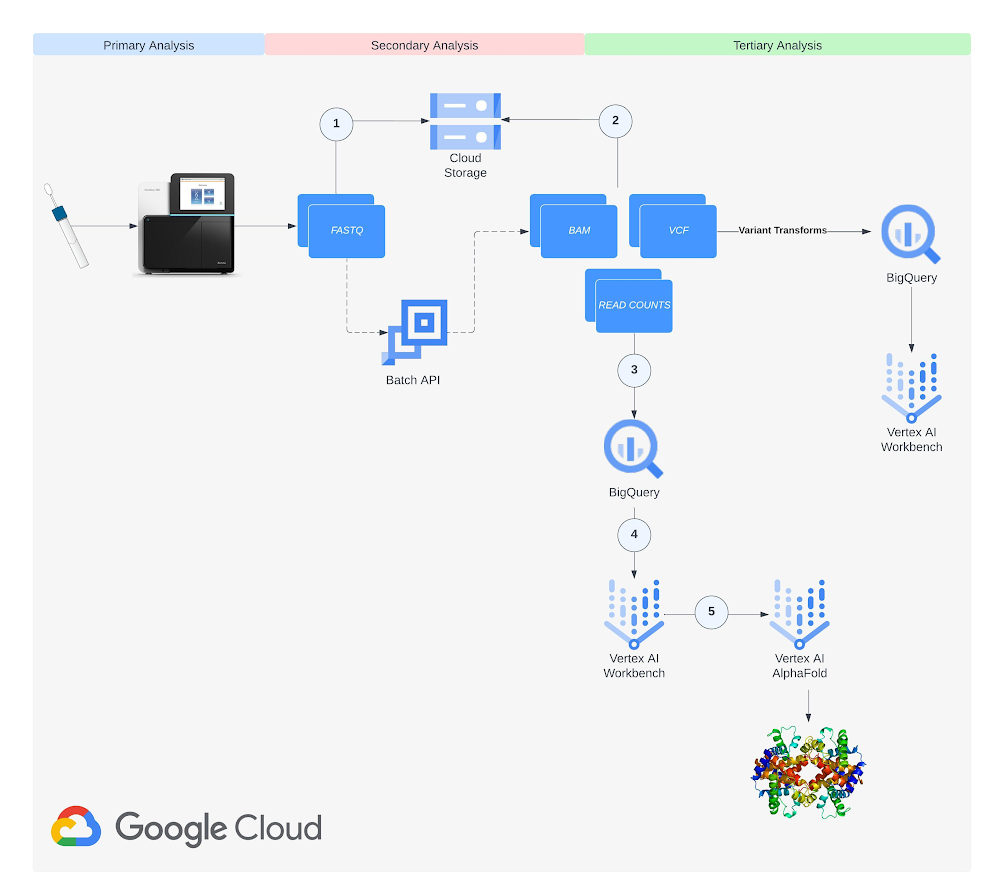
RNA-Seq and protein structure prediction with BigQuery and Vertex AI
RNA-Seq and protein structure prediction are essential tools in modern biological research, facilitating insights into the molecular mechanisms of diseases and

Amazon Q is a new generative artificial intelligence (AI)-powered assistant designed for work that can be tailored to your business. Amazon Q can help you get fast, relevant answers to pressing questions, solve problems, generate content, and take actions using the data and expertise found in your company’s information repositories and enterprise systems. When you chat with Amazon Q, it provides immediate, relevant information and advice to help streamline tasks, speed up decision-making, and spark creativity and innovation at work. For more information, see Amazon Q Business, now generally available, helps boost workforce productivity with generative AI.
This post demonstrates how to build a custom UI for Amazon Q Business. The customized UI allows you to implement special features like handling feedback, using company brand colors and templates, and using a custom login. It also enables conversing with Amazon Q through an interface personalized to your use case.
In this solution, we deploy a custom web experience for Amazon Q to deliver quick, accurate, and relevant answers to your business questions on top of an enterprise knowledge base. The following diagram illustrates the solution architecture.
The workflow includes the following steps:
For this walkthrough, you should have the following prerequisites:
If you already have an SSL certificate, you can skip this section.
You will receive a warning from your browser when accessing the UI if you didn’t provide a custom SSL certificate when launching the AWS CloudFormation stack. The instructions in this section show you how to create a self-signed certificate. This is not recommended for production use cases. You should obtain an SSL certificate that has been validated by a certificate authority, import it into ACM, and reference this when launching the CloudFormation stack. If you want to continue with the self-signed certificate (for development purposes), you should be able to proceed past the browser warning page. With Chrome, you will see the message Your connection is not private error message (NET::ERR_CERT_AUTHORITY_INVALID), but by choosing Advanced, you should then see a link to proceed.
The following command generates a sample self-signed certificate (for development purposes) and uploads the certificate to ACM. You can also find the script on the GitHub repo.
openssl req
  -x509 -nodes -days 365 -sha256
  -subj '/C=US/ST=Oregon/L=Portland/CN=sampleexample.com'
  -newkey rsa:2048 -keyout key.pem -out cert.pem

aws acm import-certificate --certificate fileb://cert.pem --private-key fileb://key.pem
Note down the CertificateARN to use later while provisioning the CloudFormation template.
The full source of the solution on in the GitHub repository and is deployed with AWS CloudFormation.
Choose Launch Stack to launch a CloudFormation stack in your account and deploy the template:

This template creates separate IAM roles for the Application Load Balancer, Amazon Cognito, and the EC2 instance. Additionally, it creates and configures those services to run the end-to-end demonstration.
Provide the following parameters for the stack:
AmazonQ-UI-Demo).
After the CloudFormation stack deploys successfully, copy the following values on the stack’s Outputs tab:
The actions described in this section are one-time actions. The goal is to configure an application in IAM Identity Center to represent the application you are building. Specifically, in this step, you configure IAM Identity Center to be able to trust the identity tokens by which your application will represent its authenticated users. Complete the following steps:

TrustedIssuerUrl you copied from the CloudFormation stack output.IdcApplicationArn, then run the stack.
The CloudFormation stack deploys and starts the Streamlit application on an EC2 instance on port 8080. To view the health of the application running behind the Application Load Balancer, open the Amazon EC2 console and choose Load Balancing under Target groups in the navigation pane. For debugging purposes, you can also connect to Amazon EC2 through Session Manager, a capability of AWS Systems Manager.

To access the custom UI, use the URL that you copied from the CloudFormation stack output. Choose Sign up and use the same email address for the users that were registered in IAM Identity Center.

After successful authentication, you’re redirected to the custom UI. You can enhance it by implementing custom features like handling feedback, using your companies brand colors and templates, and personalizing it to your specific use case.

To avoid future charges in your account, delete the resources you created in this walkthrough. The EC2 instance with the custom UI will incur charges as long as the instance is active, so stop it when you’re done.
AmazonQ-UI-Demo), then choose Delete.In this post, you learned how to integrate a custom UI with Amazon Q Business. Using a custom UI tailored to your specific needs and requirements makes Amazon Q more efficient and straightforward to use for your business. You can include your company branding and design, and have control and ownership over the user experience. For example, you could introduce custom feedback handling features.
The sample custom UI for Amazon Q discussed in this post is provided as open source—you can use it as a starting point for your own solution, and help improve it by contributing bug fixes and new features using GitHub pull requests. Explore the code, choose Watch in the GitHub repo to receive notifications about new releases, and check back for the latest updates. We welcome your suggestions for improvements and new features.
For more information on Amazon Q business, refer to the Amazon Q Business Developer Guide.
 Ennio Emanuele Pastore is a Senior Architect on the AWS GenAI Labs team. He is an enthusiast of everything related to new technologies that have a positive impact on businesses and general livelihood. He helps organizations in achieving specific business outcomes by using data and AI, and accelerating their AWS Cloud adoption journey.
 Deba is a Senior Architect on the AWS GenAI Labs team. He has extensive experience across big data, data science, and IoT, across consulting and industrials. He is an advocate of cloud-centered data and ML platforms and the value they can drive for customers across industries.
 Joseph de Clerck is a senior Cloud Infrastructure Architect at AWS. He leverages his expertise to help enterprises solve their business challenges by effectively utilizing AWS services. His broad understanding of cloud technologies enables him to devise tailored solutions on topics such as analytics, security, infrastructure, and automation.
Source: Original Article
Last updated: March 23, 2026